Navigation
Navigate to:
-
Reports > Attendance > Attendance / Activity Log Discrepancy Report
- Once on the report, configure the available filters to narrow your results:
- Date Range: Select the appropriate date range you would like to review.
- Activity Log / Engagement Type: Filter by the type of student activity or engagement you would like included.
- Discrepancy Type: Select the type of discrepancy you would like to identify, such as students marked Present with no Logs found, Absent with Logs found, or No Claim but Logs found.
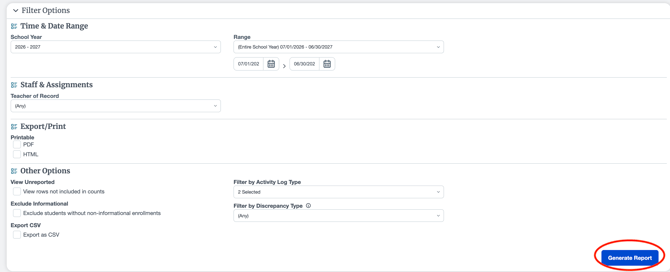
Once your filters are configured, click Generate.
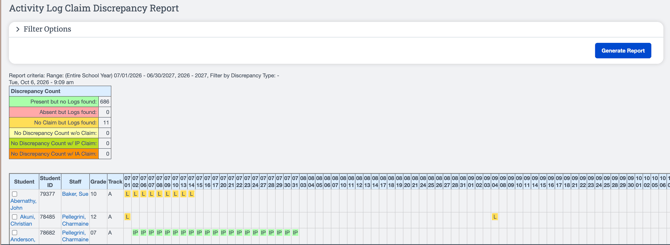
Review the Report
-
At the top of the generated report, observe the Discrepancy Count key. This provides a summary of the number of attendance claims that fall within each discrepancy category.
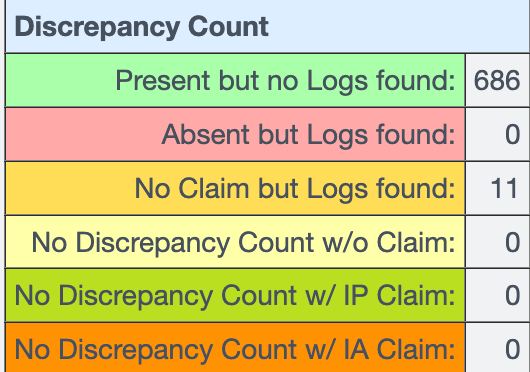
- Present but no Logs found: The student has a Present attendance claim, but no corresponding Activity Logs were found.
- Absent but Logs found: The student has an Absent attendance claim, but Activity Logs were found.
- No Claim but Logs found: Activity Logs were found for the student, but no attendance claim was entered.
- No Discrepancy Count w/o Claim: No discrepancy was identified for records without an attendance claim.
- No Discrepancy Count w/ IP Claim: No discrepancy was identified for records with an IP attendance claim.
- No Discrepancy Count w/ IA Claim: No discrepancy was identified for records with an IA attendance claim.
The report displays the selected dates across the top and each student along the left-hand side, allowing you to review attendance and Activity Log discrepancies by student and date.
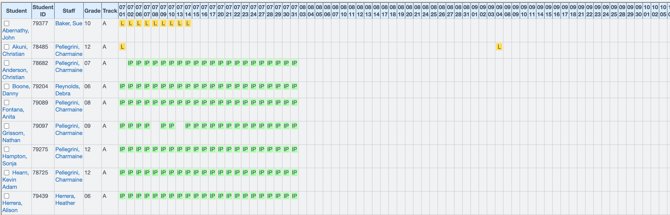
-
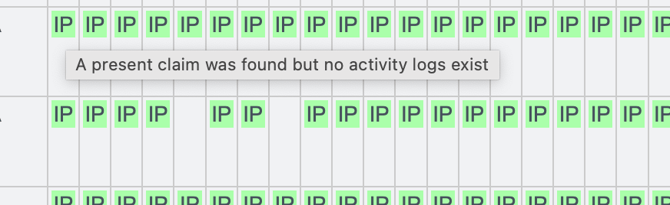
Hover over any attendance claim within the report to view additional information, including the reason the record has been identified as a discrepancy.