---
title: Calculating Cal Grant GPAs/Video
description: "Generating extracts for Current Seniors vs. Graduated Seniors\n\nFor informational purposes, you will find a document from CDE attached to the back of this manual to help you understand how Cal Grant GPA is calculated."
---
[Skip to content](https://help.schoolpathways.com/knowledge/page/admin/reports/non_ssn_gpa#main-content)
[](https://help.schoolpathways.com/knowledge?hsLang=en)
- [Help Center - Knowledge Base](https://help.schoolpathways.com/knowledge)
- [Webinar Registration Link](https://www.gotostage.com/channel/6ad5fe45cab0462a930c0420a4bb82e9)
Open main navigation
Close main navigation
- [Help Center - Knowledge Base](https://help.schoolpathways.com/knowledge)
- [Webinar Registration Link](https://www.gotostage.com/channel/6ad5fe45cab0462a930c0420a4bb82e9)
- [Contact us](https://help.schoolpathways.com/knowledge/contact-us-form-)
[Contact us](https://help.schoolpathways.com/knowledge/contact-us-form-?hsLang=en)
How can we help?
- There are no suggestions because the search field is empty.
1. [Help Center - Knowledge Base](https://help.schoolpathways.com/knowledge?hsLang=en)
2. [Compliance & State Reporting](https://help.schoolpathways.com/knowledge/compliance-state-reporting?hsLang=en)
October 2, 2025
# Calculating Cal Grant GPAs/Video
## Generating extracts for Current Seniors vs. Graduated Seniors For informational purposes, you will find a document from CDE attached to the back of this manual to help you understand how Cal Grant GPA is calculated.
---
**Table of Contents**
1. [Navigation](https://help.schoolpathways.com/knowledge/page/admin/reports/non_ssn_gpa#Navigation)
2. [Step 1: Setting up the GPA Graduation type in the SIS](https://help.schoolpathways.com/knowledge/page/admin/reports/non_ssn_gpa#Step1)
3. [Step 2: Check Your Course Catalog](https://help.schoolpathways.com/knowledge/page/admin/reports/non_ssn_gpa#Step2)
4. [Step 3: Creating Cal- Grants Extracts](https://help.schoolpathways.com/knowledge/page/admin/reports/non_ssn_gpa#Step3)
5. [FAQS](https://help.schoolpathways.com/knowledge/page/admin/reports/non_ssn_gpa#FAQS)
---
---
### **Navigation**
**Reports \>. State/Federal \> CAL Grant**
- Cal Grant GPA is calculated on a 4.00 scale only
- No extra weight for Honors (H), Advanced Placement (AP) or International Baccalaureate (IB) classes
- Excluded from GPA:
- Physical Education
- ROTC courses
- Remedial courses = Courses that aren’t counted toward HS graduation.
- **To exclude a class from Cal Grant GPA calculations**, enable and use the “**x**” **modifier** in the SIS
Go to: **Admin \> Transcripts \> Transcripts/Report Cards**, then click on the **Mods** tab.
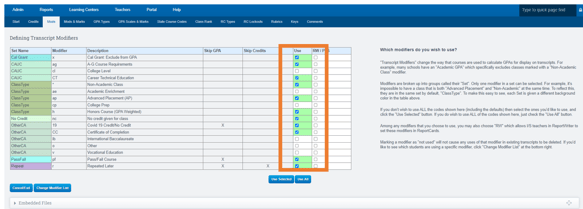
**Tips for Choosing what to Include:**
- Be sure your Modifiers are being added to your courses
[Course Modifiers User Guide](https://help.schoolpathways.com/knowledge/page/courses/8197contextmilestoneprev2fmod?hsLang=en)
- Failing grades (F) that haven’t been repeated before your verified GPA is submitted must be included
- **Pass/Fail grades DO NOT count toward the Cal Grant GPA (However, it is possible your school might assign a grade to a pass/fail class, otherwise you will not be able to use those grades)**
- If you apply *after your senior year, your GPA must include your senior-year grades.*
---
#### **1. Setting up the GPA Graduation type in the SIS**
**Admin\>Transcripts\>Transcripts/Report Cards:**
We recommend that you support 2 different Cal-Grant GPA types
Click **GPA Types**
1. One for **Cal Grant 10/11 GPA** (**for current year students**), and
2. One for **Cal Grant 10-12 GPA** (**for prior year graduated seniors**)
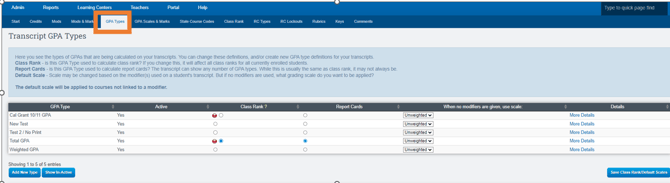
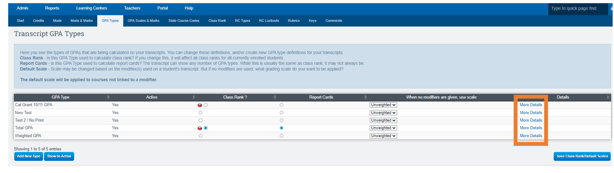
- Click **“More Details”** for the **‘Cal Grant 10/11 GPA’**
- Here is the recommended default setting for the **Cal Grant GPA Type**
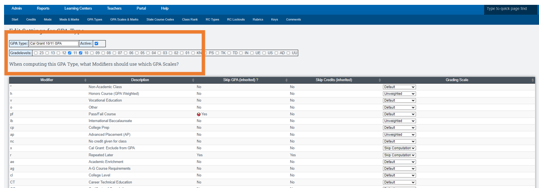
- Next set up a **Cal Grant 10-12 GPA (Prior Year Grad)** - unless you have already done so. Follow the same directions as you did for the **Cal Grant 10/11**, only this time check the boxes for grades **10, 11, & 12**. \\\\

---
#### **2. Check your Course Catalog**
### Excluding Physical Education Courses from the Cal Grant GPA calculation
The proper way to exclude PE courses from showing up on your Cal Grant Calculations is to set PE up properly in your course catalog:
**Admin \> Transcripts \> Master Course List**:
- Click and go to your **High School Catalog(s)**
- Click on the **“Edit”** link for your Semester or Trimester.
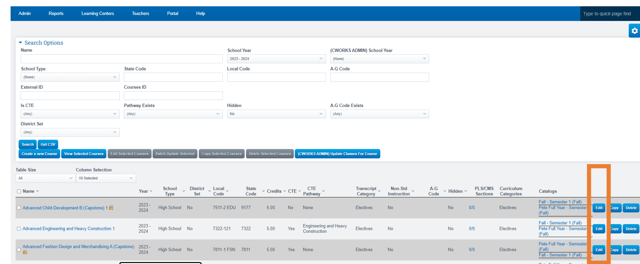
- Find your Physical Educations classes (State course codes 2512, 2513, 2514 and 2515) and check the radial button for the “x”
- (x = Cal Grant: Exclude from GPA)
- Remember to “SAVE” your changes once made.
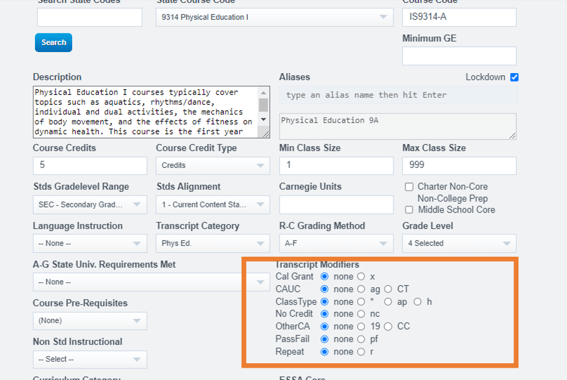
- This will automatically disallow PE from being calculated into the Cal Grant GPA. It will NOT affect any other GPA.
- (SPECIAL NOTE: ROTC and Remedial courses must be disallowed by the school as we have no way to determine those courses.)
---
#### **3. Creating Cal-Grant Extracts**
Students will be removed from the extract file if their question in Student Registration for "Parent Wishes to opt out of CAL Grant GPA Submissions" is set to Yes.
Follow this path: **Reports\>State/Federal\>Other» Cal Grant**:
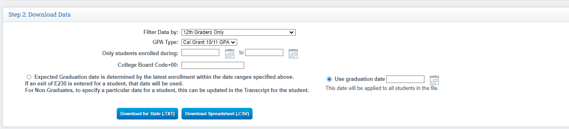
### For Current 12th Graders
- **Filter Data by:** 12th Graders Only
- **GPA Type:** Choose “Cal Grant 10/11 GPA”
- **Only Students Enrolled during:** Choose the date of your Fall Semester
- **College Board Code +00** (12345600 is ONLY used for trial extracts. That is NOT a proper college code!)
- **Choose one Bubble:**
**Expected Graduation Date**: Based on data in the System
Or
**Use Graduation Date:** Input a Graduation date to be applied for all students
Choose to download for the State or in a csv for your own viewing purposes.
### For Graduated 12th Graders
- **Filter Data by:** Graduated Students Only
- **GPA Type:** Cal Grant 10/12 GPA
- **Only Students Enrolled during:** the Start of last year’s Fall Semester to the end of the Fall Semester of the Current School year.
- **College Board Code +00** (12345600 is ONLY used for trial extracts. That is NOT a proper college code!)
- **Choose one Bubble:**
**Expected Graduation Date**: Based on data in the System
Or
**Use Graduation Date:** Input a Graduation date to be applied for all students
Choose to download for the State or in a csv for your own viewing purposes.
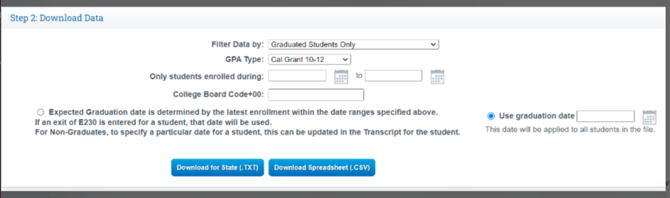
You are now ready to generate your extract for Graduated Seniors.
**Congratulations: You’re done!**
### What is my Cal Grant GPA?
**Your Cal Grant GPA will be calculated on a 4.00 scale (to two decimal places) and extra weight will not be added for Honors, Advanced Placement or International Baccalaureate classes.**
- Your GPA must include all grades from your sophomore year, the summer following your sophomore year, your junior year and the summer following your junior year, **except those for Physical Education, Reserve Officers Training Corps (ROTC) and remedial courses.** (Remedial courses are those that aren’t counted toward high school graduation.)
- ***If you apply after your senior year, your GPA must include your senior-year grades.***
- Failing grades for classes you haven’t repeated before your verified GPA is submitted also must be included. (Keep in mind that your GPA for college admission will be calculated differently.)
---
### FAQs
*Here are some frequently asked questions and answers:*
**I have students that are 11th Graders and are graduating this year. Why don't they show on my Cal Grant extract?**
Remember, Cal Grant is based on how a student does in classes in their 10th and 11th grade years. Therefore, an 11th grader will NOT show as having completed their 11th grade year even if they are graduating early!
You have two options:
1. Promote the student to 12th grade mid-year so the student is designated as a 12th grader and appears in the current year Cal Grant extract, or
2. Wait until the student actually graduates then create a Cal Grant extract for Graduated Students for submission.
**I’ve attended several colleges. What college credits count and from which school?**
To determine what grades can be included in your Cal Grant GPA, you’ll need to check with the registrar’s office at the college you plan to attend to verify the courses they will accept. It is up to that school to determine the college credits you’ll be allowed to transfer over and also the GPA you have earned.
**Do pass/fail grades count toward my GPA?**
***No. All Cal Grant GPAs must be calculated based on a 4.00 scale.*** It’s possible your school could assign a grade to pass/fail classes. If your school isn’t able to do so, you will not be able to use those grades. If not using those grades affects your overall GPA, you may wish to submit your SAT or ACT scores in lieu of your GPA.
**Can I fax my GPA Verification Form to the Commission?**
Yes, however, we would prefer to receive the forms via regular mail. Faxed copies of the form must be hand-processed and could slow the processing of your Cal Grant application.
**If I fail a class in the 10th grade and retake it in the 11th grade, does the failed class count toward my Cal Grant GPA?**
If the class you failed is the same class you took again and passed, the Commission will accept the passing grade and the failed grade should not be included in the overall GPA.
**I am home-schooled. How do I get my verified Cal Grant GPA?**
If you are home-schooled or attend a non-accredited charter school, you must submit your SAT, ACT or GED test scores. Complete the student section of the Cal Grant GPA Verification Form and attach a copy of your test scores to it. If submitting test scores, a school does not need to complete the bottom section of the GPA Verification Form. The scores and the GPA Verification Form must be sent to the Commission by the Cal Grant application deadline.
**My GPA is very low and I would like to improve it. How do I do that?**
If you’re graduating from high school with a GPA that is not high enough to meet the Cal Grant GPA minimum requirements, you can improve or re-establish your GPA at a California Community College. To re-establish your GPA for Cal Grant B Competitive awards, you must complete at least 16 cumulative units of undergraduate transferable/degree-applicable credits for academic course work at an accredited California Community College, with at least a 2.0 community college GPA.
If you’ve completed at least 16 college units, but less than 24 units, please ask your community college to submit your re-established GPA to the Commission.
If you’re still in high school and you’ve completed 16 community college units, but less than 24 college semester units, you may use either your re-established college GPA or your high school GPA if it is at least 2.0 (you should use the highest GPA score).
You’ll need to make an appointment with your college’s financial aid office to discuss your wish to have your re-established GPA reported. Please do not wait until the last minute.
- [School Pathways Essentials](https://help.schoolpathways.com/knowledge/school-pathways-essentials?hsLang=en#main-content)
- [First Steps](https://help.schoolpathways.com/knowledge/school-pathways-essentials?hsLang=en#first-steps)
- [Down to the Basics](https://help.schoolpathways.com/knowledge/school-pathways-essentials?hsLang=en#down-to-the-basics)
- [Commonly Asked Questions](https://help.schoolpathways.com/knowledge/school-pathways-essentials?hsLang=en#commonly-asked-questions)
- [AI Tools](https://help.schoolpathways.com/knowledge/ai-tools?hsLang=en)
- [Onboarding](https://help.schoolpathways.com/knowledge/onboarding?hsLang=en#main-content)
- [Onboarding Modules 1-5](https://help.schoolpathways.com/knowledge/onboarding?hsLang=en#onboarding-modules-1-5)
- [School Configuration](https://help.schoolpathways.com/knowledge/school-configuration?hsLang=en)
- [End of Year SIS Processes & Resources](https://help.schoolpathways.com/knowledge/end-of-year-sis-processes-resources?hsLang=en)
- [Compliance & State Reporting](https://help.schoolpathways.com/knowledge/compliance-state-reporting?hsLang=en#main-content)
- [CALPADS](https://help.schoolpathways.com/knowledge/compliance-state-reporting?hsLang=en#calpads)
- [CALPADS File Source](https://help.schoolpathways.com/knowledge/compliance-state-reporting?hsLang=en#calpads-file-source)
- [CALPADS: Fall 1](https://help.schoolpathways.com/knowledge/compliance-state-reporting?hsLang=en#calpads-fall-1)
- [CALPADS: Fall 2](https://help.schoolpathways.com/knowledge/compliance-state-reporting?hsLang=en#calpads-fall-2)
- [Admin](https://help.schoolpathways.com/knowledge/admin?hsLang=en#main-content)
- [Optional Features](https://help.schoolpathways.com/knowledge/admin?hsLang=en#optional-features)
- [Admin: Transcript/ Report Cards](https://help.schoolpathways.com/knowledge/admin?hsLang=en#admin-transcript-report-cards)
- [New Employee Process](https://help.schoolpathways.com/knowledge/admin?hsLang=en#new-employee-process)
- [Master Agreement Admin Set Up](https://help.schoolpathways.com/knowledge/admin?hsLang=en#master-agreement-admin-set-up)
- [Admin Dashboard Icon Definitions](https://help.schoolpathways.com/knowledge/admin?hsLang=en#admin-dashboard-icon-definitions)
- [Staff: Support Staff Oversight Setup](https://help.schoolpathways.com/knowledge/admin?hsLang=en#staff-support-staff-oversight-setup)
- [Admin: Student Information](https://help.schoolpathways.com/knowledge/admin?hsLang=en#admin-student-information)
- [Admin: Attendance](https://help.schoolpathways.com/knowledge/admin?hsLang=en#admin-attendance)
- [Admin: Staff Information](https://help.schoolpathways.com/knowledge/admin?hsLang=en#admin-staff-information)
- [Admin: Test Module](https://help.schoolpathways.com/knowledge/admin?hsLang=en#admin-test-module)
- [Reports](https://help.schoolpathways.com/knowledge/reports?hsLang=en#main-content)
- [Civil Rights Reporting](https://help.schoolpathways.com/knowledge/reports?hsLang=en#civil-rights-reporting)
- [Reports: Create A Report](https://help.schoolpathways.com/knowledge/reports?hsLang=en#reports-create-a-report)
- [Graduation Reports](https://help.schoolpathways.com/knowledge/reports?hsLang=en#graduation-reports)
- [Other Reports](https://help.schoolpathways.com/knowledge/reports?hsLang=en#other-reports)
- [Staff](https://help.schoolpathways.com/knowledge/reports?hsLang=en#staff)
- [Parent Info](https://help.schoolpathways.com/knowledge/reports?hsLang=en#parent-info)
- [Reports: Attendance](https://help.schoolpathways.com/knowledge/reports?hsLang=en#reports-attendance)
- [Teachers](https://help.schoolpathways.com/knowledge/teachers?hsLang=en#main-content)
- [Report Cards](https://help.schoolpathways.com/knowledge/teachers?hsLang=en#report-cards)
- [Logins](https://help.schoolpathways.com/knowledge/teachers?hsLang=en#logins)
- [Classroom Management System (CMS)](https://help.schoolpathways.com/knowledge/classroom-management-system-cms?hsLang=en#main-content)
- [CMS - Classes](https://help.schoolpathways.com/knowledge/classroom-management-system-cms?hsLang=en#cms-classes)
- [CMS - Reports / Work Records](https://help.schoolpathways.com/knowledge/classroom-management-system-cms?hsLang=en#cms-reports-work-records)
- [CMS - View/Change Registration](https://help.schoolpathways.com/knowledge/classroom-management-system-cms?hsLang=en#cms-view-change-registration)
- [CMS - Report Cards](https://help.schoolpathways.com/knowledge/classroom-management-system-cms?hsLang=en#cms-report-cards)
- [Master Curriculum - Saving Grade Book Assignments to Create](https://help.schoolpathways.com/knowledge/classroom-management-system-cms?hsLang=en#master-curriculum-saving-grade-book-assignments-to-create)
- [CMS - Tags](https://help.schoolpathways.com/knowledge/classroom-management-system-cms?hsLang=en#cms-tags)
- [CMS - Tabs](https://help.schoolpathways.com/knowledge/classroom-management-system-cms?hsLang=en#cms-tabs)
- [CMS - Attendance](https://help.schoolpathways.com/knowledge/classroom-management-system-cms?hsLang=en#cms-attendance)
- [CMS - Student/Parent Portal](https://help.schoolpathways.com/knowledge/classroom-management-system-cms?hsLang=en#cms-student-parent-portal)
- [Personalized Learning (PLS)](https://help.schoolpathways.com/knowledge/personalized-learning-pls?hsLang=en#main-content)
- [PLS - Admin/Teacher Overview of System](https://help.schoolpathways.com/knowledge/personalized-learning-pls?hsLang=en#pls-admin-teacher-overview-of-system)
- [PLS - Master Agreements](https://help.schoolpathways.com/knowledge/personalized-learning-pls?hsLang=en#pls-master-agreements)
- [PLS - Admin Archiving & Audit File](https://help.schoolpathways.com/knowledge/personalized-learning-pls?hsLang=en#pls-admin-archiving-audit-file)
- [PLS: Admin Policies, Permissions](https://help.schoolpathways.com/knowledge/personalized-learning-pls?hsLang=en#pls-admin-policies-permissions)
- [PLS - Admin](https://help.schoolpathways.com/knowledge/personalized-learning-pls?hsLang=en#pls-admin)
- [PLS: Teacher Archive/Sign Documents](https://help.schoolpathways.com/knowledge/personalized-learning-pls?hsLang=en#pls-teacher-archive-sign-documents)
- [Google Classroom Set Up /PLS Standalone](https://help.schoolpathways.com/knowledge/personalized-learning-pls?hsLang=en#google-classroom-set-up-pls-standalone)
- [Create New Class/Import Curricula from Bridge](https://help.schoolpathways.com/knowledge/personalized-learning-pls?hsLang=en#create-new-class-import-curricula-from-bridge)
- [PLS - Attendance/ Grade Export](https://help.schoolpathways.com/knowledge/personalized-learning-pls?hsLang=en#pls-attendance-grade-export)
- [PLS - General Info](https://help.schoolpathways.com/knowledge/personalized-learning-pls?hsLang=en#pls-general-info)
- [PLS - Student Progress Documenting/Learning Logs](https://help.schoolpathways.com/knowledge/personalized-learning-pls?hsLang=en#pls-student-progress-documenting-learning-logs)
- [PLS - Archive Reports](https://help.schoolpathways.com/knowledge/personalized-learning-pls?hsLang=en#pls-archive-reports)
- [PLS: Gradebook/ Attendance](https://help.schoolpathways.com/knowledge/personalized-learning-pls?hsLang=en#pls-gradebook-attendance)
- [PLS: Report Cards/Progress Reports](https://help.schoolpathways.com/knowledge/personalized-learning-pls?hsLang=en#pls-report-cards-progress-reports)
- [PLS: Master Agreements](https://help.schoolpathways.com/knowledge/personalized-learning-pls?hsLang=en#pls-master-agreements-1)
- [Bridge Integrations & Add-Ons](https://help.schoolpathways.com/knowledge/bridge-integrations-add-ons?hsLang=en#main-content)
- [Canvas](https://help.schoolpathways.com/knowledge/bridge-integrations-add-ons?hsLang=en#canvas)
- [K-12 Stride](https://help.schoolpathways.com/knowledge/bridge-integrations-add-ons?hsLang=en#k-12-stride)
- [Edgenuity](https://help.schoolpathways.com/knowledge/bridge-integrations-add-ons?hsLang=en#edgenuity)
- [Google](https://help.schoolpathways.com/knowledge/bridge-integrations-add-ons?hsLang=en#google)
- [Agilix/Buzz](https://help.schoolpathways.com/knowledge/bridge-integrations-add-ons?hsLang=en#agilix-buzz)
- [MISC](https://help.schoolpathways.com/knowledge/bridge-integrations-add-ons?hsLang=en#misc)
- [Archivable Documents](https://help.schoolpathways.com/knowledge/archivable-documents?hsLang=en#main-content)
- [Archiving](https://help.schoolpathways.com/knowledge/archivable-documents?hsLang=en#archiving)
- [Work Samples](https://help.schoolpathways.com/knowledge/archivable-documents?hsLang=en#work-samples)
- [Reports](https://help.schoolpathways.com/knowledge/archivable-documents?hsLang=en#reports)
- [Budgets](https://help.schoolpathways.com/knowledge/budgets?hsLang=en#main-content)
- [Budget Process](https://help.schoolpathways.com/knowledge/budgets?hsLang=en#budget-process)
- [Setup Process](https://help.schoolpathways.com/knowledge/budgets?hsLang=en#setup-process)
- [Communications](https://help.schoolpathways.com/knowledge/communications?hsLang=en#main-content)
- [Communication Tool Overview](https://help.schoolpathways.com/knowledge/communications?hsLang=en#communication-tool-overview)
- [Course/ Curriculum](https://help.schoolpathways.com/knowledge/course-curriculum?hsLang=en#main-content)
- [Curriculum Options](https://help.schoolpathways.com/knowledge/course-curriculum?hsLang=en#curriculum-options)
- [CTE Pathways](https://help.schoolpathways.com/knowledge/course-curriculum?hsLang=en#cte-pathways)
- [Setting Up](https://help.schoolpathways.com/knowledge/course-curriculum?hsLang=en#setting-up)
- [A-G Requirement Tracking](https://help.schoolpathways.com/knowledge/course-curriculum?hsLang=en#a-g-requirement-tracking)
- [Course Options](https://help.schoolpathways.com/knowledge/course-curriculum?hsLang=en#course-options)
- [Mass Updates](https://help.schoolpathways.com/knowledge/course-curriculum?hsLang=en#mass-updates)
- [District Information & Oversight](https://help.schoolpathways.com/knowledge/district-information-oversight?hsLang=en#main-content)
- [IDs](https://help.schoolpathways.com/knowledge/district-information-oversight?hsLang=en#ids)
- [Staff Records](https://help.schoolpathways.com/knowledge/district-information-oversight?hsLang=en#staff-records)
- [Jump from One Scope to Another](https://help.schoolpathways.com/knowledge/district-information-oversight?hsLang=en#jump-from-one-scope-to-another)
- [Students](https://help.schoolpathways.com/knowledge/district-information-oversight?hsLang=en#students)
- [Help Tab](https://help.schoolpathways.com/knowledge/help-tab?hsLang=en)
- [Enrollment Registration](https://help.schoolpathways.com/knowledge/enrollment-registration?hsLang=en#main-content)
- [Enrollment Policies](https://help.schoolpathways.com/knowledge/enrollment-registration?hsLang=en#enrollment-policies)
- [Student Grade Level Advancement](https://help.schoolpathways.com/knowledge/enrollment-registration?hsLang=en#student-grade-level-advancement)
- [Registration Options](https://help.schoolpathways.com/knowledge/enrollment-registration?hsLang=en#registration-options)
- [Enrollment Options SP/SIS](https://help.schoolpathways.com/knowledge/enrollment-registration?hsLang=en#enrollment-options-sp-sis)
- [Expanded Learning Program](https://help.schoolpathways.com/knowledge/expanded-learning-program?hsLang=en)
- [Forms & Survey](https://help.schoolpathways.com/knowledge/forms-survey?hsLang=en#main-content)
- [Reports](https://help.schoolpathways.com/knowledge/forms-survey?hsLang=en#reports)
- [Admin Setup Process](https://help.schoolpathways.com/knowledge/forms-survey?hsLang=en#admin-setup-process)
- [Create a Form & or Survey](https://help.schoolpathways.com/knowledge/forms-survey?hsLang=en#create-a-form-or-survey)
- [Manage Forms & Surveys](https://help.schoolpathways.com/knowledge/forms-survey?hsLang=en#manage-forms-surveys)
- [Household & Family Resources](https://help.schoolpathways.com/knowledge/household-family-resources?hsLang=en)
- [Reg- Online](https://help.schoolpathways.com/knowledge/reg-online?hsLang=en#main-content)
- [Enrollment Interest Form](https://help.schoolpathways.com/knowledge/reg-online?hsLang=en#enrollment-interest-form)
- [REG - Online New School Year Setup](https://help.schoolpathways.com/knowledge/reg-online?hsLang=en#reg-online-new-school-year-setup)
- [REG - Online Admin](https://help.schoolpathways.com/knowledge/reg-online?hsLang=en#reg-online-admin)
- [Online Class Registration](https://help.schoolpathways.com/knowledge/reg-online?hsLang=en#online-class-registration)
- [PLS Xpress](https://help.schoolpathways.com/knowledge/pls-xpress?hsLang=en#main-content)
- [Curricula](https://help.schoolpathways.com/knowledge/pls-xpress?hsLang=en#curricula)
- [Students](https://help.schoolpathways.com/knowledge/pls-xpress?hsLang=en#students)
- [Admin](https://help.schoolpathways.com/knowledge/pls-xpress?hsLang=en#admin)
- [Rest API Product](https://help.schoolpathways.com/knowledge/rest-api-product?hsLang=en#main-content)
- [REST API/Push Settings](https://help.schoolpathways.com/knowledge/rest-api-product?hsLang=en#rest-api-push-settings)
- [Synchronous / Live Interaction.... Engagement Calendar](https://help.schoolpathways.com/knowledge/synchronous-live-interaction-engagement-calendar?hsLang=en#main-content)
- [Synchronous/ Engagement Calendar](https://help.schoolpathways.com/knowledge/synchronous-live-interaction-engagement-calendar?hsLang=en#synchronous-engagement-calendar)
- [Synchronous / Engagement Calendar Reports](https://help.schoolpathways.com/knowledge/synchronous-live-interaction-engagement-calendar?hsLang=en#synchronous-engagement-calendar-reports)
- [Policy Set-Up Synchronous Instruction](https://help.schoolpathways.com/knowledge/synchronous-live-interaction-engagement-calendar?hsLang=en#policy-set-up-synchronous-instruction)
- [Student Lottery System](https://help.schoolpathways.com/knowledge/student-lottery-system?hsLang=en#main-content)
- [Student Lottery System: MISC](https://help.schoolpathways.com/knowledge/student-lottery-system?hsLang=en#student-lottery-system-misc)
- [Student Lottery System-Standalone Product](https://help.schoolpathways.com/knowledge/student-lottery-system?hsLang=en#student-lottery-system-standalone-product)
- [Student Lottery System : How to Run the Lottery](https://help.schoolpathways.com/knowledge/student-lottery-system?hsLang=en#student-lottery-system-how-to-run-the-lottery)
- [Student Lottery System Setup](https://help.schoolpathways.com/knowledge/student-lottery-system?hsLang=en#student-lottery-system-setup)
- [Student Dashboard](https://help.schoolpathways.com/knowledge/student-dashboard?hsLang=en#main-content)
- [MISC](https://help.schoolpathways.com/knowledge/student-dashboard?hsLang=en#misc)
- [Add Notes](https://help.schoolpathways.com/knowledge/student-dashboard?hsLang=en#add-notes)
- [Icon Definitions](https://help.schoolpathways.com/knowledge/student-dashboard?hsLang=en#icon-definitions)
- [Tabs/ Links](https://help.schoolpathways.com/knowledge/student-dashboard?hsLang=en#tabs-links)
- [Special Programs](https://help.schoolpathways.com/knowledge/student-dashboard?hsLang=en#special-programs)
- [Discipline](https://help.schoolpathways.com/knowledge/student-dashboard?hsLang=en#discipline)
- [Cume File](https://help.schoolpathways.com/knowledge/student-dashboard?hsLang=en#cume-file)
- [Medical Tab](https://help.schoolpathways.com/knowledge/student-dashboard?hsLang=en#medical-tab)
- [Embedded Letters](https://help.schoolpathways.com/knowledge/student-dashboard?hsLang=en#embedded-letters)
- [Staff Dashboard](https://help.schoolpathways.com/knowledge/staff-dashboard?hsLang=en#main-content)
- [Personal Account Settings for Admin/Teachers](https://help.schoolpathways.com/knowledge/staff-dashboard?hsLang=en#personal-account-settings-for-admin-teachers)
- [Dropdowns](https://help.schoolpathways.com/knowledge/staff-dashboard?hsLang=en#dropdowns)
- [Tabs/Icons](https://help.schoolpathways.com/knowledge/staff-dashboard?hsLang=en#tabs-icons)
- [Special Programs](https://help.schoolpathways.com/knowledge/special-programs?hsLang=en#main-content)
- [Special Programs Basics](https://help.schoolpathways.com/knowledge/special-programs?hsLang=en#special-programs-basics)
- [CERS](https://help.schoolpathways.com/knowledge/special-programs?hsLang=en#cers)
- [NPS](https://help.schoolpathways.com/knowledge/special-programs?hsLang=en#nps)
- [Student/Parent Portal](https://help.schoolpathways.com/knowledge/student-parent-portal?hsLang=en#main-content)
- [Guides for Teachers](https://help.schoolpathways.com/knowledge/student-parent-portal?hsLang=en#guides-for-teachers)
- [Guides for Parents/Students](https://help.schoolpathways.com/knowledge/student-parent-portal?hsLang=en#guides-for-parents-students)
- [Admin/Staff User Guides](https://help.schoolpathways.com/knowledge/student-parent-portal?hsLang=en#admin-staff-user-guides)
- [Testing](https://help.schoolpathways.com/knowledge/testing?hsLang=en#main-content)
- [Reports (SSRs)](https://help.schoolpathways.com/knowledge/testing?hsLang=en#reports-ssrs)
- [PFT Submissions Manual 2018-2019](https://help.schoolpathways.com/knowledge/testing?hsLang=en#pft-submissions-manual-2018-2019)
- [NWEA](https://help.schoolpathways.com/knowledge/testing?hsLang=en#nwea)
- [Test Module](https://help.schoolpathways.com/knowledge/testing?hsLang=en#test-module)
- [Tiered Reengagement](https://help.schoolpathways.com/knowledge/tiered-reengagement?hsLang=en#main-content)
- [Staff Process for Tiered Reengagement](https://help.schoolpathways.com/knowledge/tiered-reengagement?hsLang=en#staff-process-for-tiered-reengagement)
- [Admin/Teacher Guides](https://help.schoolpathways.com/knowledge/tiered-reengagement?hsLang=en#admin-teacher-guides)
- [Settings & Security](https://help.schoolpathways.com/knowledge/settings-security?hsLang=en#main-content)
- [School Policies](https://help.schoolpathways.com/knowledge/settings-security?hsLang=en#school-policies)
- [Trigger Emails](https://help.schoolpathways.com/knowledge/settings-security?hsLang=en#trigger-emails)
- [Bottom Toolbar Features](https://help.schoolpathways.com/knowledge/bottom-toolbar-features?hsLang=en#main-content)
- [Page Policies](https://help.schoolpathways.com/knowledge/bottom-toolbar-features?hsLang=en#page-policies)
- [Collector](https://help.schoolpathways.com/knowledge/bottom-toolbar-features?hsLang=en#collector)
- [Activity Logs](https://help.schoolpathways.com/knowledge/bottom-toolbar-features?hsLang=en#activity-logs)
- [Webinars](https://help.schoolpathways.com/knowledge/webinars?hsLang=en#main-content)
- [Webinars](https://help.schoolpathways.com/knowledge/webinars?hsLang=en#webinars)
- [End of Year Checklist for Classroom Based /Video](https://help.schoolpathways.com/knowledge/webinars?hsLang=en#end-of-year-checklist-for-classroom-based-video)
- [Distance Learning / Videos](https://help.schoolpathways.com/knowledge/webinars?hsLang=en#distance-learning-videos)
- [Zoom](https://help.schoolpathways.com/knowledge/zoom?hsLang=en#main-content)
- [Reports](https://help.schoolpathways.com/knowledge/zoom?hsLang=en#reports)
- [Teachers Step 2](https://help.schoolpathways.com/knowledge/zoom?hsLang=en#teachers-step-2)
- [Teachers Step 1](https://help.schoolpathways.com/knowledge/zoom?hsLang=en#teachers-step-1)
- [Admin](https://help.schoolpathways.com/knowledge/zoom?hsLang=en#admin)
- [CALPADS](https://help.schoolpathways.com/knowledge/calpads?hsLang=en#main-content)
- [CCI Dashboard Tour](https://help.schoolpathways.com/knowledge/calpads?hsLang=en#cci-dashboard-tour)
[](https://help.schoolpathways.com/knowledge?hsLang=en)
| [Webinar Registration Link](https://www.gotostage.com/channel/6ad5fe45cab0462a930c0420a4bb82e9) | [SIS Log In](https://milestone.plsis.com/mod.php/index.php?) | [School Pathways Blog](https://www.gotostage.com/channel/6ad5fe45cab0462a930c0420a4bb82e9) | Contact Us |
| --- | --- | --- | --- |
[mailto:customerservice@schoolpathways.com](mailto:customerservice@schoolpathways.com)
```json
{
"@context" : "https://schema.org",
"@type" : "VideoObject",
"caption" : {
"@type" : "MediaObject",
"contentUrl" : "https://help.schoolpathways.com/media-transcripts/84720585547/en.vtt",
"inLanguage" : "en",
"name" : "en Captions"
},
"contentUrl" : "https://8139893.fs1.hubspotusercontent-na1.net/hubfs/8139893/Calculating%20Cal%20Grant%20GPAs.mp4",
"dateModified" : "2025-10-01T16:13:06.236Z",
"duration" : "PT14M59.1S",
"height" : 1080,
"name" : "Calculating Cal Grant GPAs",
"thumbnailUrl" : "https://8139893.fs1.hubspotusercontent-na1.net/hubfs/8139893/Calculating%20Cal%20Grant%20GPAs.mp4/medium.jpg",
"uploadDate" : "2022-09-12T22:07:04.083Z",
"width" : 1920
}
```
```json
{
"@context" : "https://schema.org",
"@type" : "Organization",
"address" : {
"@type" : "PostalAddress",
"addressCountry" : "USA",
"addressLocality" : "Portola",
"addressRegion" : "CA",
"postalCode" : "96122",
"streetAddress" : "PO Box 432"
},
"description" : "School Pathways offers K-12 Student Information System (SIS) and education software for charter schools and non-traditional programs.",
"email" : "hello@schoolpathways.com",
"logo" : "https://learn.schoolpathways.com/hubfs/School%20Pathways%20Horizontal%20logo%20DARK.png",
"name" : "School Pathways",
"sameAs" : [ "https://www.linkedin.com/company/school-pathways-llc", "https://www.facebook.com/schoolpathways/", "https://x.com/_schoolpathways" ],
"telephone" : "866-200-6936",
"url" : "https://schoolpathways.com/"
}
```